Continuous Delivery Model: Overview
Introduction
The Continuous Delivery (CD) Model provides a comprehensive framework for delivering software from initial development through production deployment and ongoing maintenance. This model ensures quality, traceability, and compliance throughout the entire software delivery lifecycle.
Unlike traditional linear Software Development Lifecycle (SDLC) approaches that rely on manual handoffs and stage-gate approvals, the CD Model integrates automation, quality gates, and continuous validation at every step. This approach reduces lead time, increases deployment frequency, and improves software quality through rapid feedback loops.
The 12-Stage Model
The CD Model consists of 12 distinct stages that guide software from code authoring to production operation:

This visualization shows the complete flow through all stages, including quality gates, environment transitions, and approval points. Each stage has specific purposes, quality gates, and validation criteria that must be met before proceeding to the next stage.
Traditional vs CD Model Approach
Traditional SDLC (Waterfall/Stage-Gate):
Traditional approaches follow a linear progression through fixed phases:
- Development → Testing → Validation → Production
- Manual handoffs between teams
- Testing happens late in the cycle
- Long feedback loops (weeks to months)
- Environment-specific configurations that drift over time
- Bottlenecks when multiple teams share environments
CD Model Approach:
The CD Model reimagines software delivery with:
- Purpose-built stages for specific validation activities
- Automated progression based on quality gates
- Testing integrated throughout the pipeline
- Rapid feedback loops (minutes to hours)
- Infrastructure as Code ensures environment consistency
- Parallel execution without environment conflicts
- Continuous validation at every stage
Understanding the Visual Notation
The CD Model uses specific visual elements to represent different concepts. Understanding these symbols is essential for reading the model diagrams.
Start Elements
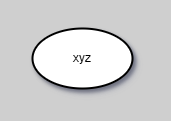
Start elements indicate entry points into the CD Model workflow. These represent where work begins, typically when a developer starts authoring changes on a local branch.
Quality Gates
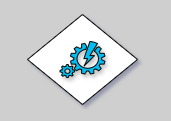
Quality gates are automated or manual checkpoints that validate specific criteria before allowing progression to the next stage. Examples include:
- Code quality standards (linting, formatting)
- Test coverage thresholds
- Security scan results
- Performance benchmarks
- Peer approval
If quality gates fail, the pipeline stops, preventing defects from progressing further.
Signoff Points

Signoff points represent formal approvals required at critical stages. These may be:
- Automated approvals based on quality metrics
- Manual approvals from stakeholders or release managers
- Compliance artifact sign-offs
- Security review approvals
Exploration Activities
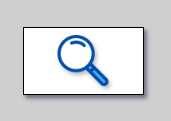
Exploration activities represent human-driven validation that complements automated testing. These include:
- Exploratory testing by QA teams
- User acceptance testing (UAT)
- Stakeholder demos and feedback
- Manual verification of edge cases
Environment Agents

Environment agents represent different types of execution environments:
- DevBox: Local development environments
- Build Agents: CI/CD pipeline runners
- Deploy Agents: Specialized agents with production access
Production-Like Test Environments (PLTE)
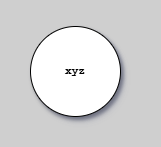
PLTEs are, optimally ephemeral, isolated, environments that emulate production characteristics.
PLTEs enable:
- Realistic testing without production risk
- Parallel testing for multiple topic branches
- Production IaC validation
- Performance and security testing in production-like conditions
The 12 Stages Overview
Here's a high-level overview of each stage.
For detailed explanations, see the stage-specific articles.

Stages 1-7: Development Through Testing:
- Authoring Changes: Create code, config, requirements on local topic branches
- Pre-commit: Validate changes locally before committing (5-10 min time-box)
- Merge Request: Peer review and automated validation
- Commit: Integrate validated changes into the main branch
- Acceptance Testing: Validate functional requirements in PLTE
- Extended Testing: Performance, security, and compliance validation
- Exploration: Stakeholder validation and exploratory testing
Stages 8-12: Release Through Production:
- Start Release: Create release candidate and documentation
- Release Approval: Obtain formal approval for production deployment
- Production Deployment: Deploy to production environment
- Live: Monitor and validate production behavior
- Release Toggling: Control feature exposure with feature flags (optional)
For detailed explanations of each stage:
Key Principles
Shift-Left Everything
The CD Model emphasizes "shift-left" practices - moving validation activities as early as possible in the development process:
- Testing: Unit tests run in Stage 2 (Pre-commit), not Stage 6
- Security: Vulnerability scanning starts in Stage 2, not Stage 11
- Compliance: Requirements defined in Stage 1, not discovered in Stage 9
Early validation finds defects when they're cheapest to fix and fastest to remediate.
Fail Fast
Quality gates at every stage ensure rapid feedback. If something fails:
- The pipeline stops immediately
- The team is notified within minutes
- The issue is fixed before proceeding
This prevents defects from progressing through the pipeline and accumulating.
Automation Over Documentation
While documentation remains important, the CD Model prioritizes:
- Automated tests over Manual test plans
- Isolated testing infrastructure over Horizontal End to End release train environments
- Infrastructure as Code over environment documentation
- Pipeline configuration over deployment procedures
- Automated compliance checks over manual reviews
This ensures consistency, control of variability and reduces manual errors.
Continuous Integration
All developers integrate their changes to the main branch frequently (multiple times per day). This:
- Reduces merge conflicts
- Enables rapid feedback
- Maintains a releasable main branch
- Supports trunk-based development
See Trunk-Based Development for more details.
Traceability
Every change is traceable through the entire pipeline:
- Commits linked to requirements and user stories
- Test results linked to specific changes
- Deployment history tracked
- Compliance evidence automatically generated
Patterns and Variations
The CD Model can be implemented in different patterns based on regulatory requirements and risk profile:
Release Approval (RA) Pattern:
- Suitable for regulated, high-risk environments
- Manual approval gates at Stage 9
- Comprehensive audit trail
- Extended validation phases
Continuous Deployment (CDE) Pattern:
- Suitable for non-regulated, fast-iteration environments
- Automated approval at Stage 9
- Feature flags control exposure
- Rapid delivery cycles
See Implementation Patterns for detailed guidance on choosing and implementing patterns.
Benefits of the CD Model
Faster Time to Market:
- Automated pipeline reduces manual delays
- Parallel testing accelerates validation
- Continuous integration prevents integration debt
Higher Quality:
- Early defect detection through shift-left practices
- Automated testing at every stage
- Quality gates prevent defects from progressing
Reduced Risk:
- Small, frequent changes are easier to validate and rollback
- Automated compliance checks ensure consistency
- Production-like testing catches issues before deployment
Better Compliance:
- Automated evidence generation
- Traceability from requirements to deployment
- Audit trail built into the pipeline
Improved Developer Experience:
- Fast feedback loops (minutes, not days)
- Clear quality expectations
- Automated repetitive tasks
How to Use This Documentation
If you're new to the CD Model:
- Read this overview to understand the concept
- Review Stages 1-7 to understand the development flow
- Review Stages 8-12 to understand the release flow
- Explore Implementation Patterns to choose an approach
If you're implementing the CD Model:
- Choose your implementation pattern (RA or CDE)
- Review Environments to understand infrastructure needs
- Review Testing Strategy to plan test coverage
- Review Security to integrate security scanning
If you're optimizing an existing pipeline:
- Map your current process to the 12 stages
- Identify missing quality gates or validation
- Review Repository Patterns if using monorepo/polyrepo
- Implement shift-left practices incrementally
References
Related Documentation:
- Stages 1-7: Development to Testing
- Stages 8-12: Release to Production
- Implementation Patterns
- Environments Architecture
- Testing Strategy Overview
- Security
- Trunk-Based Development
Additional Resources:
Tutorials | How-to Guides | Explanation | Reference
You are here: Explanation — understanding-oriented discussion that clarifies concepts.