Repository Patterns
Introduction
Repository organization is a foundational decision that affects how teams collaborate, how code is versioned, and how the CD Model is implemented.
The way you structure your repositories influences build times, dependency management, deployment coordination, and team autonomy.
This article explains the two primary repository patterns - monorepo and polyrepo - and provides guidance on choosing the right approach for your organization and system architecture.
It also introduces the concept of adjacent repositories, which are repositories used for specialized purposes, beyond being a trunk for one or more modules.
An example of an adjacent repository, is a kubernetes GitOps repository, which is a special form of IaC that constrains the IaC into being declarations only etc.
A gitops repository cannot easily be integrated into a trunk, nor should it: We want the GitOps repository's history to be the history of the cluster it controls, one to one.
Impact on CD Model
Repository structure directly impacts several CD Model stages:
- Stage 3 (Merge Request): Code review scope and automation
- Stage 4 (Commit): Build and test execution strategy
- Stage 5 (Acceptance Testing): PLTE provisioning and test coordination
- Stage 8 (Start Release): Release candidate creation and versioning
- Stage 10 (Production Deployment): Deployment coordination and sequencing
Choosing the right pattern aligns repository organization with your system architecture and team structure.
Monorepo Pattern
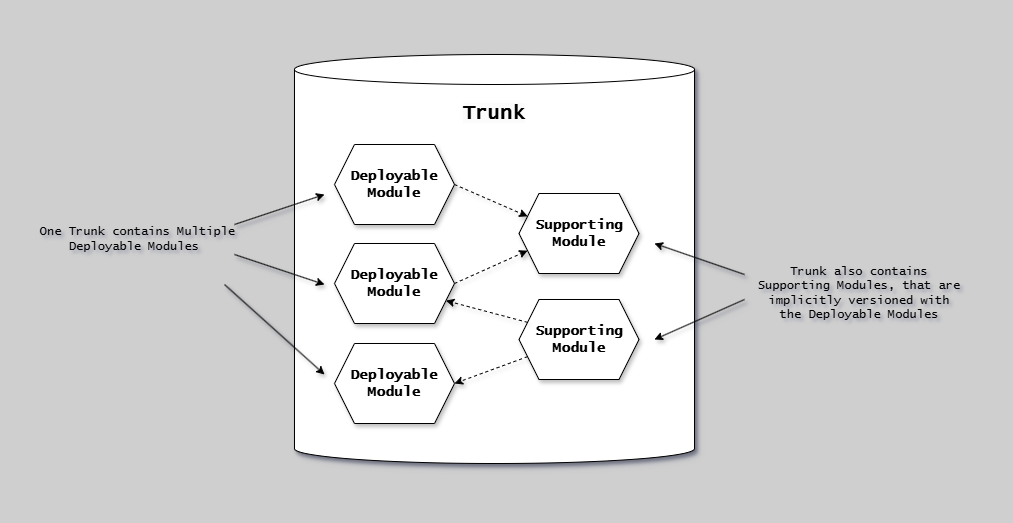
This diagram illustrates the single-repository (mono-repository) pattern:
The diagram shows a single repository containing more than one deployable module. In this pattern, multiple deployable modules share a single version history and repository boundary. Path filters (glob patterns) define the boundaries of each deployable module within the repository, allowing independent versioning and deployment of each unit despite sharing the same repository.
This is also called a single-repository to distinguish it from large-scale organizational mono-repositories.
The pattern enables atomic cross-cutting changes while maintaining independent deployment pipelines per deployable module.
Characteristics
Single Repository:
- All application code in one repository
- Shared infrastructure and tooling
- Unified version history
- Single source of truth
Code Organization:
- Always organized by technology first, then modules directories (Many stacks dont blend in shared folders, so we just keep them apart as a design decision)
- Shared tooling and configuration
- Common configuration files
- Unified dependency management, controlling pinning and implicit bindings
Example Structure:
Single stack mono:
monorepo/
├── services/       # module group, one technology stack folder, ex. dotnet
│   ├── api/        # deployable module
│   ├── web/        # deployable module
│   └── worker/     # deployable module
├── shared/         # module group, one technology stack folder, ex. dotnet
│   ├── models/     # module, implicit consume
│   └── utils/      # module, implicit consume
├── infrastructure/ # one technology stack folder, ex. azure Bicep
└── docs/           # one technology stack folder, ex. markdown via mkdocs
Benefits
Atomic Changes Across Boundaries:
- Refactor multiple services in single commit
- Update shared libraries and consumers together
- No breaking changes across repository boundaries
- Single pull request for cross-cutting changes
Simplified Dependency Management:
- Shared dependencies at root level
- No version conflicts between modules
- Easier to ensure consistency
- Single dependency update affects all modules
Code Sharing:
- Shared utilities and libraries
- Reusable components
- Common infrastructure code
- Centralized documentation
Unified Tooling:
- Single CI/CD pipeline configuration
- Shared code quality tools
- Consistent build process
- Centralized security scanning
Easier Refactoring:
- Cross-module refactoring in one PR
- Immediate validation of changes
- No coordination between repositories
- Safe, atomic updates
Tradeoffs
Build Times:
- Potentially longer build times, if not doing incremental builds etc.
- Need for selective builds (build only changed modules) locally and in pipelines
- Caching strategies essential
- Requires sophisticated build tooling
Access Control:
- Coarser-grained permissions
- All developers can see all code
- May not suit distributed teams with confidentiality needs
- CODEOWNERS file helps but limited
Repository Size:
- Can grow very large over time
- Git operations may slow down
- Requires Git LFS for large assets
- Clone times increase
Cognitive Overhead:
- Developers may be overwhelmed by scope
- Harder to navigate large codebase
- IDE performance considerations
When to Use Monorepo
Best for:
- Team coupled services: Services that a team maintains together
- Shared libraries: Heavy code reuse across projects
- 1 to many teams: < 50-100 developers working in same domain, however it can scale to google sized orgs.
- Rapid iteration: Fast-moving products requiring frequent cross-cutting changes
- Unified ownership: Single team or organization owns all code
Example Scenarios:
- Startup with multiple microservices owned by one team
- Platform with shared component library
- Full-stack application with frontend, backend, and infrastructure code
- Internal tools suite with common dependencies
CD Model Integration
Stage 4 (Commit):
- Use change detection to build only affected modules
- Run targeted test suites based on changed files
- Generate individual build artifacts pr. module
Stage 5 (Acceptance Testing):
- Single PLTE instance with a service vertical deployed
- Simplified service coordination
- Integrated end-to-end testing in extended testing stage 6
Stage 8 (Start Release):
- Create independent release tags for all modules
- Independent release notes
Stage 10 (Production Deployment):
- Multiple deployment pipelines are affecting production
- Deployment orchestration when multiple services changed in same change.
- Should use feature flags to decouple deployment from release
Polyrepo Pattern
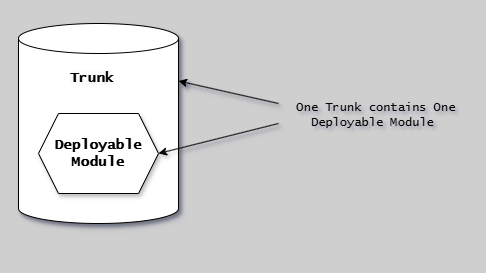
This diagram illustrates the poly-repository pattern: The diagram shows the pattern where a repository boundary perfectly aligns with a single deployable module boundary.
In this pattern, one repository contains exactly one deployable module - whether that's a versioned component (library, container, package) or a runtime system (service, application).
The version of any commit is directly equal to the version of the deployable module, making versioning simple and straightforward.
This pattern is commonly used in GitHub open-source projects and enforces decoupling through versioned modules, where dependencies between units are managed through published versioned artifacts consumed via package managers rather (pinning and stitching) than direct code references (implicit).
Characteristics
Multiple Repositories:
- One repository per service or versioned component (one repository pr. deployable module)
- Independent version history
- Separate access controls
- Isolated tooling and configuration
Code Organization:
- Each repository is self-contained
- Dependencies managed per repository
- Independent documentation
- Service-specific configuration
Example Structure:
repo-1/
├── .github/          # deployable module, pipeline
├── api-service/      # deployable module, software
├── docs/             # deployable module, docs
├── infrastructure/   # deployable module, infrastructure
└── specs/            # deployable module, specs
repo-2/
├── .github/          # deployable module, pipeline
├── web-service/      # deployable module, software
├── docs/             # deployable module, docs
├── infrastructure/   # deployable module, infrastructure
└── specs/            # deployable module, specs
repo-3/
├── .github/          # deployable module, pipeline
├── worker-service/
├── docs/             # deployable module, docs
├── infrastructure/   # deployable module, infrastructure
└── specs/            # deployable module, specs
repo-4/
├── .github/          # deployable module, pipeline
├── docs/             # deployable module, docs
├── shared-models/    # deployable module, software, explicit consume
└── specs/            # deployable module, specs
shared-utils-repo/
├── .github/          # deployable module, pipeline
├── docs/             # deployable module, docs
└── shared-utils/     # deployable module, software, explicit consume
└── specs/            # deployable module, specs
shared-infrastructure-repo/
├── .github/          # deployable module, pipeline
├── docs/             # deployable module, docs
├── infrastructure/   # deployable module, infrastructure
└── specs/            # deployable module, specs
Benefits
Team Autonomy:
- Teams own and control their repositories
- Independent decision-making
- Different tech stacks possible
- Reduced coordination overhead
Clear Boundaries:
- Enforces service boundaries
- Prevents unintended coupling
- Clear ownership and responsibility
- API-first integration
Independent Deployment:
- Services deploy on separate schedules
- Faster deployment cycles per service
- Lower blast radius for changes
- Easier rollback of individual services
Granular Access Control:
- Fine-grained permissions per repository
- Suitable for distributed teams
- Supports confidential projects
- Compliance with data access requirements
Smaller, Focused Repositories:
- Faster clone times
- Simpler navigation
- Better IDE performance
- Focused code reviews
Tradeoffs
Cross-Repository Changes:
- Changes spanning multiple repos require coordination
- Multiple pull requests needed
- Potential for breaking changes
- Version compatibility challenges
- Contract testing required
- Each repository must have standardized (versioned, named etc.) artifacts produced
- Repository to Repository bindings are NOT allowed ever. Instead formal version dependency menagement must be used
Dependency Management Complexity:
- Shared libraries versioned separately
- Version conflicts between repositories
- Need for dependency update coordination
- Breaking changes require careful management
Tooling Duplication:
- CI/CD configuration duplicated across repos
- Inconsistent tooling possible
- More maintenance overhead
- Potential for drift
Discoverability:
- Harder to find related code
- No unified search across repositories
- Documentation spread across repos
- Learning curve for new developers
When to Use Polyrepo
Best for:
- Loosely coupled services: Microservices with independent lifecycles
- Large organizations: Multiple teams with separate ownership
- Distributed teams: Teams in different locations or with confidentiality needs
- Independent deployment cadences: Services that release on different schedules
- Clear service boundaries: Well-defined APIs between services (Contracts)
Example Scenarios:
- Large enterprise with independent product teams
- Microservices with separate deployment schedules
- Organization with confidential or regulated modules
- Platform with third-party integrations requiring isolation
CD Model Integration
Stage 4 (Commit):
- Independent build pipelines per repository
- Parallel builds across repositories
- Repository-specific testing
Stage 5 (Acceptance Testing):
- PLTE isolated pr. repository, any HE2E coordinates across multiple repositories
- Version pinning for module dependencies
- Contract testing required between deployable modules to avoid HE2E (especially service calls, configurations)
- More complex environment setup
Stage 8 (Start Release):
- Independent release tags per repository
- Service-specific versioning
- Separate release notes per service
Stage 10 (Production Deployment):
- Deploy services independently
- Backward compatibility requirements
- Rolling deployment strategies
- API versioning for compatibility
Repository Types
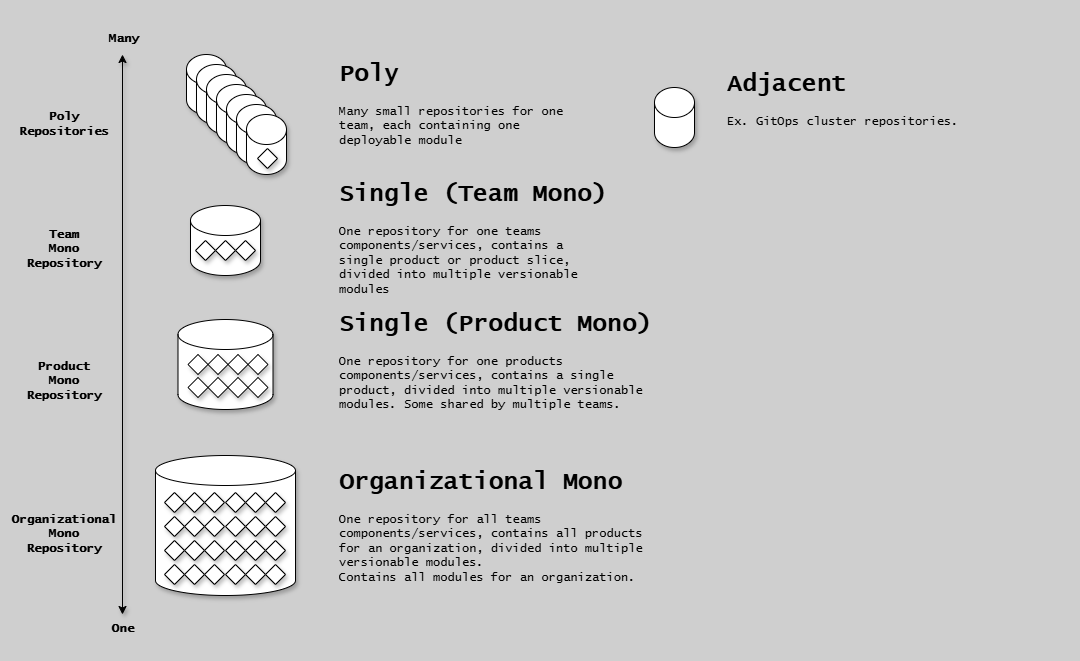
This diagram shows the repository type taxonomy: The diagram categorizes repositories by the number of deployable modules they contain. Poly-repository (left) contains exactly one deployable module - the repository boundary perfectly aligns with the deployable module boundary, making versioning simple (any commit = new version of the unit). Mono-repository (right) contains more than one deployable module, with three subtypes: Team mono-repository (single-repository) where one team owns multiple deployable modules, Product mono-repository (single-repository) where multiple teams collaborate on one product's deployable modules, and Organizational mono-repository used by large organizations like Google/Facebook (not recommended for most teams). The diagram establishes the fundamental distinction: poly = one deployable module, mono = multiple deployable modules.
Side-by-Side Analysis

| Factor | Monorepo | Polyrepo |
|---|---|---|
| Atomic Cross-Cutting Changes | ✅ Excellent - single commit | ❌ Difficult - multiple PRs |
| Traceability | ✅ Excellent - single timeline | ❌ Difficult - multiple timelines, potentially different branch topologies |
| Team Autonomy | ⚠️ Limited - shared delivery architecture | ⚠️ Depends on tooling. Max freedom = No supporting platform |
| Pipeline Complexity | ⚠️ Requires specialized tooling | ✅ Simple tooling |
| Independent Deployment | ✅ Coordinated releases simple | ⚠️ Coordinated releases hard |
| Dependency Management | ✅ Complicated - implict+explicit | ⚠️ Complex - explicit |
| Code Reuse | ✅ Easy - shared directly | ⚠️ Requires versioning, access control mgmt. etc. |
| Access Control | ⚠️ Coarse-grained | ✅ Fine-grained |
| Discoverability | ✅ All code in one place | ⚠️ Spread across repos |
| Tooling | ⚠️ Requires specialized tooling | ⚠️ Duplicated, scattered, hard-coded |
Decision Factors
Choose Monorepo if:
- Services frequently change together
- Heavy code sharing between modules
- Small to medium team size
- Unified ownership and responsibility
- Need atomic cross-cutting changes
Choose Polyrepo if:
- Services have independent lifecycles
- Multiple teams with separate ownership
- Need fine-grained access control
- Services deploy on different schedules
- Clear service boundaries exist
Poor Repository Design (Anti-Pattern)
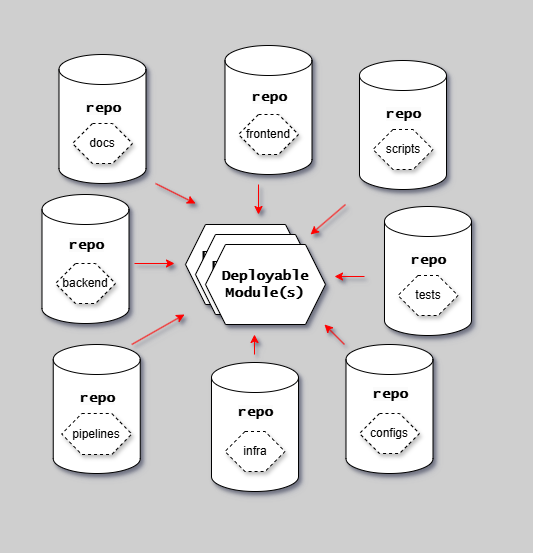
This diagram shows the anti-pattern of splitting repositories by technical boundary: The diagram illustrates the problematic pattern of organizing repositories by technology type rather than by deployable module boundaries. For example, creating separate repositories for frontend/, backend/, scripts/, documentation/, and infrastructure/ - each representing a technical concern rather than a cohesive deployable module. This creates dependency hell where there is no coherency or frontier of what one specific version consists of. Changes to a single feature require coordinating across multiple repositories (frontend repo, backend repo, scripts repo), with no clear version boundary for the complete system. This violates the principle that repositories should align with either poly-repository (one deployable module) or single-repository (multiple deployable modules owned together) patterns.
How to Avoid This Anti-Pattern
✅ DO:
- Organize repositories around deployable module boundaries, not technical boundaries
- Use poly-repository pattern (one deployable module per repository) OR single-repository pattern (multiple deployable modules per repository owned by same team)
- Keep all code for a deployable module together (frontend, backend, scripts, specs, docs, infrastructure) in the same repository
- Version Everything-as-Code (EaC) artifacts together, grouped by deployable module boundaries
❌ DO NOT:
- Create separate repositories for frontend, backend, scripts, documentation, or infrastructure unless each is a distinct deployable module with proper contracts.
- Create loose gatherings of repositories with cross-repository dependencies
- Have ANY head-to-head dependencies between repos (dependencies MUST be managed through proper pinning and stitching cross-reposotory)
- Split a single deployable module across multiple repositories
Best Practices
Module Boundaries: Define explicit boundaries, document dependencies, enforce with tooling (linters, dependency checks)
Versioning:
- Monorepo: Independent SemVer/CalVer module versioning
- Polyrepo: SemVer/CalVer versioning per repository (one module), dependency manifests specify compatible versions
Dependency Management:
Poly and Mono both:
- Root-level with lock file pr. stack (go.sum, packages.json etc.) for consistency
- Dependency manager must support in-repository implicit bindings
- External-to-the-repo-bindings are all pinned in source and stitched in build.
Automation Tools:
- Monorepo: Change detection, selective builds, distributed caching (Eac, Nx, Bazel, Turborepo)
- Mono+Poly: Repository templates, shared pipeline definitions, automated updates (Dependabot)
+many many more.
Impact on CD Model Stages
| Stage | Monorepo | Polyrepo |
|---|---|---|
| Stage 3 | Larger PRs, single review | Smaller focused PRs, may need coordination |
| Stage 4 | Change detection for selective builds | Independent builds in parallel |
| Stage 5 | Single PLTE with all services | Version pinning, contract testing |
| Stage 8 | Single orchestrated release event possible for RA | Multiple independent release tags |
| Stage 10 | Coordinated deployment or feature flags | Independent deployment schedules |
Polyrepo Coordination Requirements: Contract testing for API compatibility, version pinning in PLTE, deployment sequencing for backward compatibility, API versioning for gradual rollout.
Next Steps
- CD Model Overview - Understand how repos integrate with stages
- Stages 1-7 - See repository impact on development
- Environments - Understand PLTE provisioning strategies
- Implementation Patterns - Choose RA or CDe pattern
- Testing Strategy Integration - Test coordination approaches
References
Tutorials | How-to Guides | Explanation | Reference
You are here: Explanation — understanding-oriented discussion that clarifies concepts.